

Article Summary
A gaming speaker is an audio solution designed to reproduce game effects, dialogue, music, and other digital sounds through external speakers. The best choice depends on the games you play, your room environment, your preferred sound profile, and the devices you need to connect.This article explores gaming speaker types, essential technical specifications, connectivity options, sound positioning, troubleshooting methods, and long-term care. It also explains how buyers can evaluate product quality and supplier capabilities when sourcing gaming audio equipment for personal use, retail, or commercial projects.
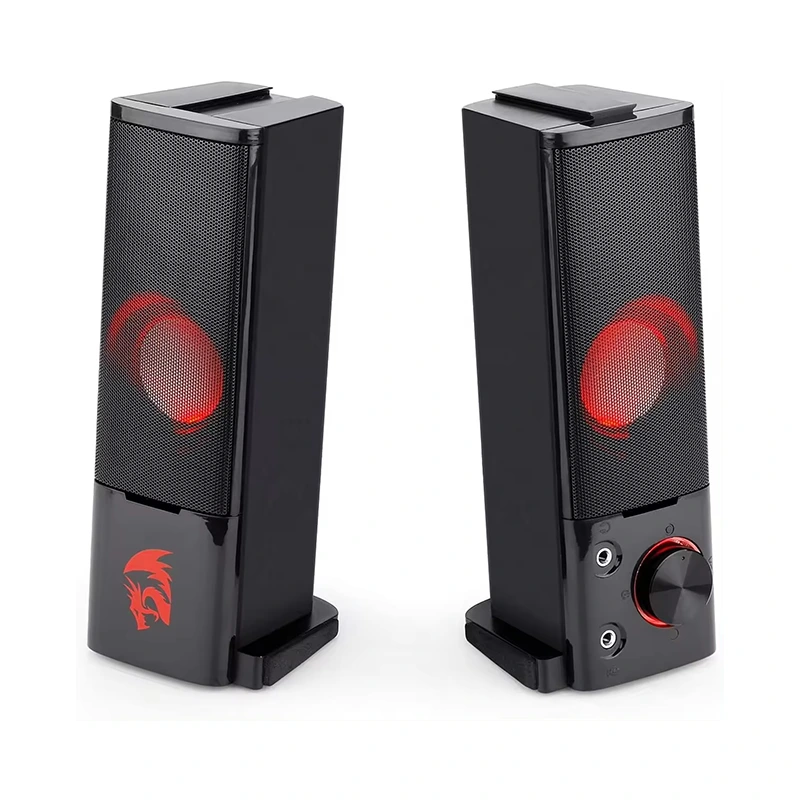
1. What Is a Gaming Speaker?
A gaming speaker is an external audio device used with gaming PCs, consoles, laptops, and other compatible entertainment systems. It converts digital or analog audio signals into sound, allowing players to hear in-game dialogue, sound effects, background music, and voice communication without wearing headphones.
Unlike compact speakers intended primarily for casual listening, gaming-oriented models may include features such as enhanced dialogue clarity, adjustable sound profiles, bass controls, RGB lighting, multiple connection options, and convenient desktop controls. Actual features vary by product, so buyers should always check the specifications of an individual model.
How Does a Gaming Speaker Work?
The audio signal travels from the connected device to the speaker through a supported interface, such as USB, a 3.5 mm audio connection, Bluetooth, or an optical input. The speaker's internal electronics process the signal, and its drivers convert electrical energy into audible sound.
Some systems use two separate speakers to create stereo sound, while others combine multiple drivers or a dedicated subwoofer to reproduce a wider frequency range. Virtual surround processing may also simulate a more spatial presentation, although the result depends on the implementation, room conditions, and source material.
Who Can Benefit from a Gaming Speaker?
- PC gamers: Players who want clear sound without wearing a headset throughout the day.
- Console users: Gamers who prefer shared audio in a living room or entertainment area.
- Streamers and content creators: Users who need flexible audio for gaming, video playback, and everyday computer work.
- Casual players: People who prioritize convenience, simple controls, and an enjoyable sound experience.
- Gaming businesses: Retailers, gaming lounges, and equipment distributors looking for audio products suited to their customers.
2. Why Does a Gaming Speaker Matter?
Audio quality affects how players interpret what happens on screen. Poorly balanced sound can make dialogue difficult to understand, cause sound effects to overpower important cues, or introduce distortion at higher volumes. A well-matched gaming speaker can help create a more comfortable and engaging environment.
Improve Environmental Awareness
Footsteps, approaching vehicles, environmental changes, and distant effects can provide useful context during gameplay. Clear audio reproduction helps players distinguish these sounds from music and general background noise. Stereo placement can also contribute to a sense of direction when the game and audio setup support it.
However, external speakers are affected by room reflections and nearby surfaces. In competitive games where precise directional cues are critical, a well-designed headset may still provide a more consistent experience, particularly in noisy environments.
Create a More Immersive Atmosphere
Adventure games, racing titles, role-playing games, and cinematic experiences often use soundtracks and environmental effects to establish mood. A gaming speaker with balanced midrange, clear high frequencies, and controlled bass can help reproduce these details without making the sound tiring or overwhelming.
Support Comfortable Long Sessions
Some players experience discomfort when wearing headphones for extended periods. Speakers remove the need for constant ear contact and allow users to remain aware of conversations or sounds in their surroundings. Listening fatigue can still occur at high volumes, so reasonable volume levels and regular breaks remain important.
Make Shared Entertainment Easier
Speakers allow friends and family to hear the same game audio without requiring individual headsets. They can also serve as everyday desktop speakers for online meetings, videos, music, and other applications, provided the model supports the required connections and sound profile.
3. Common Types of Gaming Speakers
Different speaker configurations suit different gaming spaces. Understanding their strengths and limitations is a practical first step before comparing prices or brand names.
| Speaker Type | Main Advantages | Potential Limitations | Best Suited For |
|---|---|---|---|
| 2.0 Stereo Speakers | Simple setup, separate left and right channels, compact footprint | Limited deep bass on many compact models | Everyday PC gaming and small desks |
| 2.1 Speaker System | Dedicated subwoofer can deliver deeper bass | Requires additional floor or desk space | Racing, action, and cinematic games |
| USB Gaming Speakers | Convenient digital connection on compatible devices | Compatibility and power requirements vary | PC and laptop users seeking simple installation |
| Bluetooth Speakers | Wireless placement and fewer audio cables | Latency, interference, and battery limitations may apply | Casual gaming and flexible entertainment setups |
| Compact RGB Speakers | Space-saving design and customizable lighting on supported models | Lighting does not guarantee superior sound quality | Gaming desks with limited space |
| Desktop Soundbar | Single-unit installation and a clean desk arrangement | Stereo separation depends on design and placement | Minimalist workstations and monitor setups |
Choosing Between 2.0 and 2.1 Systems
A 2.0 system contains two primary speakers, typically handling the left and right audio channels. It is often a practical choice for smaller desks, shared workspaces, and users who prefer a straightforward installation.
A 2.1 system adds a subwoofer to reproduce lower frequencies. This can create a fuller presentation for explosions, engines, and music. Nevertheless, a subwoofer needs suitable placement, and excessive bass can mask dialogue or disturb other people nearby. The right option depends on listening habits rather than channel count alone.
4. Key Features to Evaluate Before Buying
Product descriptions often highlight power, lighting, wireless functionality, or special audio modes. These details are useful, but no single specification can determine the complete listening experience. Evaluate the speaker as a system rather than relying on one headline number.
Sound Quality and Frequency Response
Frequency response describes the range of frequencies a speaker is designed to reproduce. Lower frequencies contribute to bass, midrange frequencies carry much of the character of voices and many instruments, and higher frequencies help reproduce detail and brightness.
A broad stated frequency range does not automatically mean that a speaker reproduces every frequency evenly or accurately. Where available, consider independent measurements, credible listening evaluations, distortion performance, and the intended use of the product.
Power Output and Volume
Power ratings can help describe a product, but comparisons require care. Check whether a specification refers to RMS power or peak power and whether the figures describe an individual speaker or the complete system. Higher wattage alone does not guarantee cleaner sound, greater perceived loudness, or better gaming performance.
Driver Design and Cabinet Construction
Driver size, materials, enclosure design, and internal tuning influence how sound is reproduced. A well-designed compact speaker can perform well in its intended environment, while a larger product may offer advantages in output or bass capability. Product dimensions and construction quality should be assessed alongside listening performance.
Controls and Sound Customization
Accessible volume controls, a physical mute function, bass adjustment, and clearly labeled connection ports can make daily use much easier. Software equalizers and preset modes may also help users adapt audio to different games, but the effectiveness of these features varies between products.
Lighting and Visual Design
RGB lighting can complement a gaming setup and provide visual customization. However, lighting should be treated as an aesthetic feature rather than a measure of audio performance. Consider whether lighting can be dimmed or disabled, especially when using the speakers in a bedroom or a shared office.
Build Quality and Warranty
Inspect the cabinet, control buttons, cable connections, grille, and power adapter. A stable base and durable connectors can reduce everyday handling problems. Before purchasing, review the warranty terms, support arrangements, and availability of replacement accessories.
5. Connectivity and Device Compatibility
A speaker may have attractive features but still be unsuitable if it cannot connect correctly to your gaming equipment. Confirm the available outputs on your computer, console, monitor, or television before placing an order.
USB Connections
USB speakers may receive digital audio and, on some models, power through the same cable. This can reduce cable clutter on a compatible computer. However, not every USB port or device supports the same audio functionality. Some products require separate power or use USB only for power while receiving audio through another connection.
3.5 mm Audio Input
The familiar 3.5 mm analog connection is widely used on computers, controllers, monitors, and other audio equipment. It can provide a straightforward setup, but users should verify that the selected output supports speaker audio and that any required adapters are compatible.
Bluetooth Wireless Audio
Bluetooth reduces cable requirements and makes flexible speaker placement possible. For gaming, latency is an important consideration because a delay between an on-screen action and its sound can reduce responsiveness. Actual latency depends on the source device, Bluetooth implementation, supported codecs, and speaker electronics.
For fast-paced competitive gaming, a wired connection or a wireless system specifically designed for low-latency audio may be preferable. Check documented compatibility rather than assuming that every Bluetooth speaker performs equally well.
Optical and Other Digital Inputs
Some desktop audio systems and soundbars provide optical or other digital inputs. These may be useful with compatible televisions, monitors, and consoles. Confirm the exact output format supported by the source device and the speaker, as well as any required audio settings.
| Connection | Advantages | Important Checks |
|---|---|---|
| USB | Convenient digital audio on supported devices | Audio support, power requirements, operating system compatibility |
| 3.5 mm | Simple and widely used analog connection | Correct output port, cable length, adapter requirements |
| Bluetooth | Wireless convenience and flexible placement | Latency, pairing support, interference, power or battery life |
| Optical | Digital connection for supported entertainment systems | Available ports and supported audio formats |
6. How to Choose the Right Gaming Speaker for Your Needs
The most suitable gaming speaker is not necessarily the most expensive or the most powerful. A better approach is to match the product to your actual environment, usage patterns, and budget.
Step 1: Define Your Primary Gaming Activities
Different genres place different demands on audio reproduction. Competitive shooters benefit from clear positional cues and intelligible sound effects. Role-playing games and cinematic adventures often benefit from balanced dialogue, music, and environmental sound. Racing games may be more enjoyable with controlled, impactful bass.
Write down your two or three most important listening priorities before comparing products. This makes it easier to distinguish essential features from optional extras.
Step 2: Measure Your Available Space
Measure the width and depth of the desk, the space below the monitor, and the available area for a subwoofer if required. Consider where cables will run and whether the speaker will interfere with the keyboard, mouse, monitor stand, or other equipment.
For compact workstations, a small stereo pair or soundbar may be easier to accommodate. Larger rooms may offer more placement flexibility, but speaker performance still depends on room acoustics and listening distance.
Step 3: Set a Realistic Budget
Consider the complete cost, including required adapters, power supplies, shipping, and any optional accessories. A higher-priced model may provide better materials or additional functions, but those advantages matter only if they meet your needs.
Compare products within the same general category and verify that their advertised features are included in the package. Check warranty coverage and return conditions before committing to a purchase.
Step 4: Prioritize the Features You Will Actually Use
- Choose a wired connection if stable, low-latency audio is your main priority.
- Consider a subwoofer if deeper bass is important and your room can accommodate it.
- Look for convenient volume controls if you frequently adjust sound while playing.
- Choose compact dimensions when desk space is limited.
- Evaluate lighting and software features only after checking core audio performance.
- Review product support, warranty terms, and connection compatibility.
Step 5: Compare Evidence Rather Than Marketing Claims
Read the complete specifications and look for detailed reviews that discuss real-world performance. Useful evidence includes frequency-response measurements, distortion testing, connection testing, and evaluations at different volume levels. Confirm whether reviews relate to the exact model and revision being considered.
For products without extensive independent testing, ask the seller for clear documentation, connection diagrams, user instructions, and any available performance information. Transparent product information makes it easier to compare alternatives and reduces the risk of purchasing equipment that does not meet expectations.
7. Setup and Sound Optimization
Even a capable gaming speaker may sound disappointing if it is poorly positioned or incorrectly configured. A few adjustments can improve clarity and reduce unnecessary distortion.
Position the Speakers Correctly
For a stereo pair, place the left and right speakers on opposite sides of the monitor and angle them toward the normal listening position. Keeping the speakers at approximately equal distances from the listener can help create a more balanced stereo image.
Avoid placing the speakers directly against walls or in tightly enclosed spaces unless the manufacturer recommends that arrangement. Nearby surfaces can change bass response and create unwanted reflections. Small positioning changes may noticeably affect the sound.
Adjust Operating System and Game Settings
- Select the correct playback device in the operating system.
- Confirm that the game is using the intended audio output.
- Set a moderate system volume before adjusting the speaker itself.
- Disable unnecessary audio effects if they introduce distortion or muddy the sound.
- Test dialogue, background music, and sound effects separately when possible.
Use Equalization Carefully
An equalizer can adjust the balance between different frequency ranges. If voices sound unclear, reducing excessive bass or adjusting the midrange may help. If high frequencies sound harsh, a modest reduction in the relevant range may improve comfort.
Make small changes and compare them with the original settings. Large adjustments can create new problems, and excessive bass enhancement may cause distortion or obscure important details. There is no single equalizer setting that works best for every speaker, game, and room.
Control Background Noise and Listening Volume
Fans, mechanical keyboards, traffic, and conversations can mask quiet in-game details. Positioning the speakers closer to the listener may improve perceived clarity without requiring excessive volume. Keep listening levels comfortable, particularly during long sessions, and take regular breaks.
8. Common Gaming Speaker Problems and Solutions
Many audio problems originate from connections, configuration settings, interference, or environmental conditions rather than a defective speaker. A systematic check can help identify the cause before replacement becomes necessary.
| Problem | Possible Cause | Recommended Action |
|---|---|---|
| No sound | Incorrect output device, loose cable, muted volume, insufficient power | Check power, cables, volume, and playback settings |
| Crackling or distortion | Excessive volume, poor connection, damaged cable, signal interference | Lower volume, reseat cables, test another source |
| Audio delay | Wireless latency, processing effects, source-device limitations | Test a wired connection and review audio settings |
| Weak bass | Speaker limitations, placement, incorrect settings | Adjust placement and verify bass or subwoofer settings |
| Uneven stereo sound | Unbalanced placement, channel settings, cable issues | Check left/right connections and equalize listening distances |
| Bluetooth dropouts | Distance, interference, low battery, pairing issues | Move devices closer, recharge, and pair again |
Follow a Simple Troubleshooting Sequence
- Check whether the speaker is powered on and connected correctly.
- Confirm the selected audio output and the volume level on the source device.
- Test another application, game, or compatible source device.
- Inspect cables and connectors for visible damage.
- For wireless models, check pairing, distance, battery status, and nearby interference.
- Consult the product manual and contact the seller or manufacturer if the problem persists.
Avoid opening the speaker enclosure or modifying electrical components unless you have the appropriate expertise and the work is permitted by the warranty conditions. Internal repairs may introduce safety risks or cause additional damage.
9. How to Maintain a Gaming Speaker for Long-Term Use
Regular care helps keep the speaker clean, protects its connections, and reduces avoidable wear. Maintenance does not need to be complicated, but it should be consistent.
Keep Dust and Moisture Away
Dust can accumulate on speaker grilles, control surfaces, and ventilation openings. Use a soft, dry cloth to clean the exterior. If the manufacturer permits it, use a soft brush to remove dust from accessible areas. Avoid spraying liquid directly onto the speaker or allowing moisture to enter ports and openings.
Protect Cables and Connectors
Avoid pulling a speaker by its cable or sharply bending the wire near the connector. Arrange cables to reduce tension, accidental snags, and contact with moving chair wheels. Disconnect equipment by holding the plug rather than pulling on the wire.
Use Suitable Power Equipment
Use the power adapter and electrical specifications recommended by the manufacturer. Incorrect voltage, unsuitable adapters, or damaged power cables can cause equipment failure and create safety hazards. Stop using equipment that shows signs of overheating, unusual odor, or visible electrical damage.
Store and Transport Carefully
If the speaker must be moved frequently, protect it from impact and excessive vibration. Use suitable packaging during transport and keep accessories together to prevent cable loss. For wireless models, follow the manufacturer's battery charging and storage recommendations.
10. What Should Business Buyers Consider When Sourcing Gaming Speakers?
For retailers, distributors, gaming equipment brands, and other commercial buyers, sourcing a gaming speaker involves more than comparing retail prices. Product consistency, documented specifications, packaging, communication, and after-sales support can all influence the success of a purchasing program.
Evaluate Product Specifications and Intended Markets
Before requesting a quotation, define the expected product category, dimensions, audio inputs, power requirements, appearance, and target selling price. Different customer groups may value different features. A compact speaker for entry-level desktop gaming, for example, may require a different configuration from a premium system intended for immersive home entertainment.
Request Clear Product Documentation
Ask for current specification sheets, user manuals, connection details, product photographs, packaging information, and available testing documentation. Check that the information matches the exact model being quoted. If regulatory compliance is relevant to the destination market, request applicable documentation and verify its scope and validity.
Assess Quality Control and Product Consistency
For repeated or large-volume orders, consistency between samples and production units is important. Buyers can discuss inspection procedures, functional testing, packaging standards, acceptable defect criteria, and procedures for handling nonconforming products before confirming an order.
Where appropriate, evaluate sample units under realistic usage conditions. Test connections, control functions, sound output, accessories, and packaging rather than relying exclusively on photographs or a brief product demonstration.
Review Customization and Supply Requirements
Depending on the supplier's capabilities, customization may involve color, exterior design, branding, packaging, lighting, or selected technical features. Confirm minimum order quantities, tooling requirements, sample charges, production lead times, and the approval process for customized products.
Consider Chuangquan for Your Gaming Audio Project
When evaluating gaming audio products for a business project, buyers should focus on clearly defined requirements, reliable product information, and communication throughout the sourcing process. Chuangquan can be included in your supplier evaluation when exploring relevant product and business requirements.
Visit the Chuangquan company profile to learn more about the company. For any specific gaming speaker model, confirm its availability, technical specifications, customization options, quality documentation, and commercial terms directly with the supplier before making a purchasing decision.
11. Frequently Asked Questions About Gaming Speakers
1. What makes a gaming speaker different from a regular speaker?
A gaming speaker may offer gaming-oriented sound profiles, convenient desktop controls, RGB lighting, low-latency connection options, or a design that complements gaming equipment. However, these features are not universal. A general-purpose speaker can also work well for gaming if its sound quality, connections, and performance meet the user's needs.
2. Are gaming speakers better than gaming headsets?
Neither option is universally better. Speakers are useful for shared listening, open-ear comfort, and everyday entertainment. Headsets generally offer greater privacy and can make directional cues easier to perceive in some competitive games. Background noise, room acoustics, personal comfort, and gaming style should guide the choice.
3. Can I use a gaming speaker with a console?
Yes, if the speaker supports an audio connection compatible with the console or an appropriate intermediary device. Check the console's available audio outputs, the speaker's input requirements, and any limitations involving monitor or television connections before purchasing.
4. Is Bluetooth suitable for gaming speakers?
Bluetooth can work well for casual games, music, and everyday entertainment. However, wireless latency may affect games that require precise timing. Check the product's actual latency performance and compatibility. For latency-sensitive gaming, a suitable wired connection is often the safer choice.
5. Do I need a subwoofer for a gaming speaker?
No. A subwoofer is optional. It can improve low-frequency output and make cinematic effects more impactful, but a good stereo system may be sufficient for general gaming, dialogue, and smaller rooms. Consider available space, bass preferences, neighbors, and the speaker's intended use.
6. How much power should a gaming speaker have?
There is no single power rating suitable for every setup. Room size, listening distance, speaker sensitivity, distortion performance, and intended volume all affect the result. Compare clearly defined RMS ratings where available, and avoid using peak power alone to judge sound quality.
7. Why does my gaming speaker sound distorted at high volume?
Possible causes include excessive input levels, speaker limitations, poor-quality source audio, incorrect equalizer settings, or a damaged connection. Reduce the volume, reset aggressive sound enhancements, inspect the cables, and test another audio source. If distortion continues at moderate levels, consult the product documentation or support service.
8. How can I improve gaming speaker sound without buying new equipment?
Try repositioning the speakers, directing them toward your listening position, checking left and right channel balance, and adjusting the equalizer in small increments. Make sure the correct audio device is selected and reduce background noise where possible. These changes can improve perceived clarity without additional spending.
9. What should I check before buying gaming speakers in bulk?
Confirm the model specifications, connection types, power requirements, sample quality, packaging, order quantity, lead time, warranty terms, and applicable compliance documentation. Establish clear acceptance criteria and confirm that samples represent the product configuration intended for production.
10. How long can a gaming speaker last?
Service life depends on component quality, operating conditions, usage intensity, maintenance, and electrical stability. Keeping the product clean, avoiding excessive volume, protecting the cables, and following the manufacturer's power requirements can help reduce preventable wear. Check the warranty for the specific model rather than assuming a universal lifespan.
11. Does RGB lighting improve gaming speaker performance?
No. RGB lighting is primarily a visual feature. It may help coordinate a gaming setup, but audio performance depends on the speaker's acoustic design, drivers, electronics, tuning, and placement. Buyers should evaluate sound quality separately from lighting effects.
12. How can I identify a reliable gaming speaker supplier?
Look for clear product specifications, consistent communication, transparent commercial terms, appropriate quality documentation, sample availability, and defined after-sales procedures. For larger orders, discuss production consistency, inspection requirements, packaging, and how product issues will be resolved before signing an agreement.
12. Final Thoughts: Find a Gaming Speaker That Fits Your Setup
A suitable gaming speaker should deliver the audio experience you want while fitting your available space, connected devices, listening habits, and budget. Clear dialogue, balanced sound, reliable connectivity, practical controls, and durable construction generally matter more than decorative features or isolated specification numbers.
Start by identifying your primary gaming activities, checking device compatibility, and measuring your available space. Compare product specifications carefully, evaluate real-world performance where possible, and consider warranty coverage and maintenance requirements. With a thoughtful selection and proper setup, a gaming speaker can become a versatile part of your gaming and everyday entertainment environment.
Looking for Gaming Audio Solutions?
Choosing the right gaming speaker starts with understanding your technical requirements, target market, and product expectations. Chuangquan is a company you can explore as part of your supplier research. Review the company information, prepare your product specifications, and confirm the available solutions directly with the supplier.
Whether you are evaluating products for personal use, retail distribution, or a larger sourcing project, clear requirements can help you compare options more efficiently. Visit the Chuangquan company profile and contact us to discuss your requirements, request relevant product information, and explore the next steps for your gaming audio project.
Contact Chuangquan